Global cloud providers bill in dollars or euros. Your customers, your bank account and your accounting are in Rial. Somewhere between the two, someone has to deal with the exchange rate, and how that is done decides whether the price you are quoted is fair, predictable and explainable.
This article explains how Venesh Cloud handles it: why we never promise a fixed Rial price for the future, how your wallet works, and what that means for you in practice. It deliberately contains no prices or rates. Those change, and the dashboard always shows the current ones.
The problem with a fixed Rial price
Imagine a provider that sells you a year of service today for a fixed Rial amount. If the Rial weakens over the following months, the provider's real costs, which are in dollars, stay the same while the value of what you paid shrinks. A provider in that position has only two options: build a large safety margin into every price from day one, which means you overpay, or change the terms later, which means surprises.
Neither is good for you. So we took a different approach.
One stable price, converted at the moment you pay
Every plan in our catalog has its price defined in a stable, USD-equivalent internal unit. That is the plan's "true" price, and it does not move with the Rial. The Rial figure you see is calculated from it at the moment it is shown or charged:
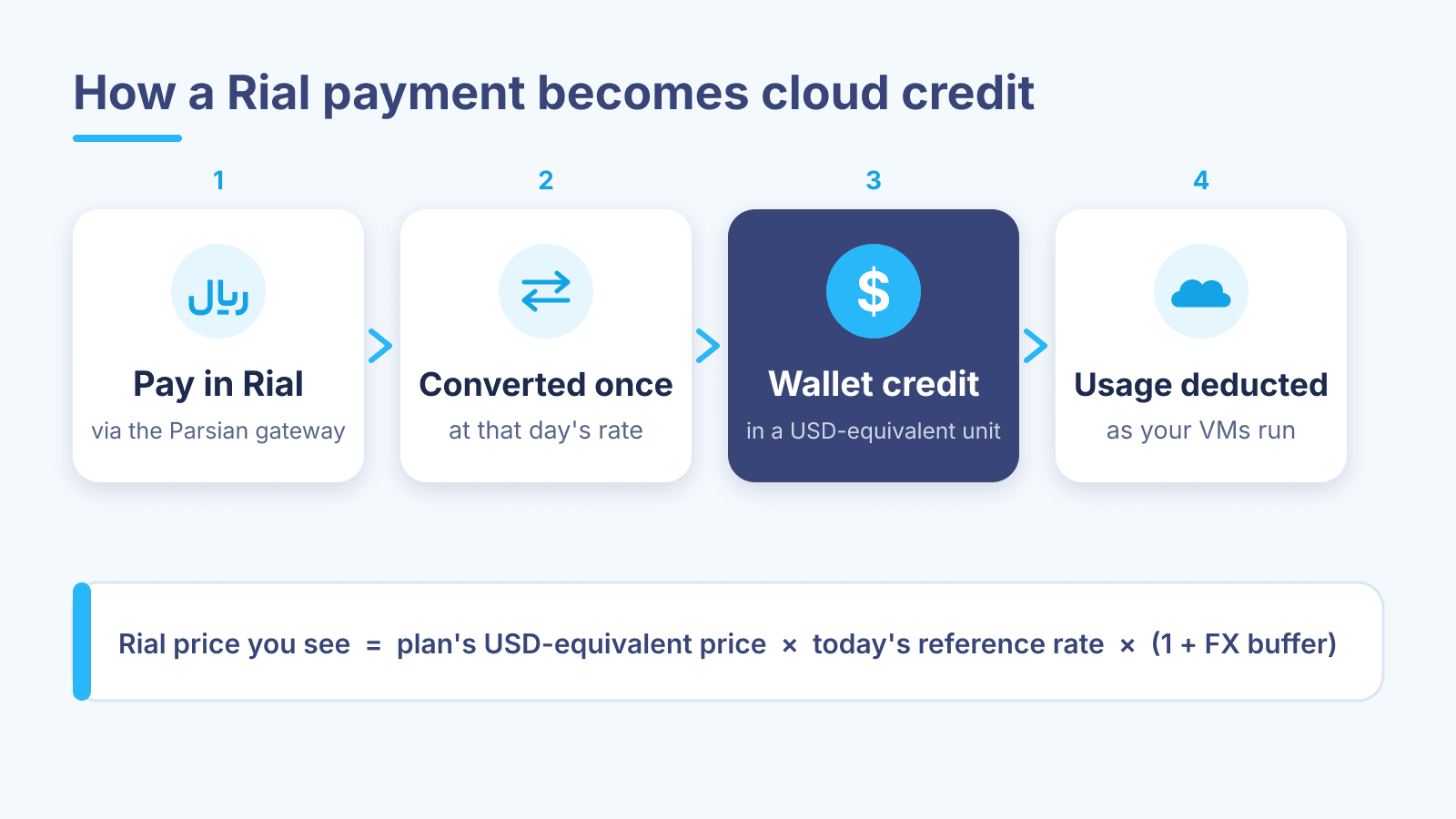
Rial price you see = the plan's USD-equivalent price × today's reference rate × (1 + FX buffer)
A few things about this formula are worth spelling out:
- The reference rate is the market rate at which dollars can actually be obtained, not a subsidised official rate that would not reflect real costs.
- The FX buffer is a deliberate cushion. It covers rate movement in the short window between the moment a price is shown and the moment it settles, and it is part of the formula rather than hidden inside it.
- Every day's rate is recorded. If you ever ask why a charge was what it was, there is a clear record of the rate used that day.
The result is that the Rial price of a plan can differ from one day to the next, but the service it buys stays exactly the same, and nobody has to pad your price against a year of uncertainty.
How the wallet works
You do not pay for each VM directly at a bank gateway. Instead, you keep a balance in your wallet and your services draw from it.
- Top up in Rial. In Billing & Wallet, choose "Top up" and enter an amount. You are sent to the Parsian bank gateway, complete the payment on the bank's own page and are redirected back to your dashboard.
- Converted once. When the payment succeeds, the amount is converted once, at that day's rate, into credit in the USD-equivalent unit.
- Held in a stable unit. From then on, your credit is stored in that stable unit, not in Rial. The dashboard shows it to you in Rial, at the current rate, for convenience.
- Deducted as you use it. Ordering a VM and each monthly renewal are charged against that credit.
Because the conversion happens once, on the day you pay, the credit you bought is protected from later swings in the Rial. It keeps buying the same amount of service.
This also explains something you may notice: the Rial figure displayed for your balance can move as the day's rate changes. That is simply the same credit shown in today's Rial. What it buys has not changed.
Ordering and renewing
- Ordering a VM. To place an order, your wallet needs to cover at least about a week of the plan you have chosen. This makes sure a new server starts with enough credit behind it. The order charge is then deducted from your credit.
- Monthly renewals. Plans renew monthly. At each renewal, the charge is taken from your wallet in the same stable unit. Your renewal settings live in Billing & Wallet, where you can turn auto-renew on or off.
- Refunds. When a refund applies, it is credited back to your wallet in the same unit it was charged in, so an exchange-rate movement in between does not work against you.
Full visibility into your balance
Everything that touches your wallet is listed in its transaction history: every top-up, order charge, renewal and refund, with the date and amount. Invoices for your charges are listed on the same page. Downloadable PDF receipts are on the way.
You never have to guess where your credit went.
What this means for you in practice
- Top up for what you plan to use. Since credit is stored in a stable unit, a larger top-up is not exposed to later Rial movements. It is simply prepaid service.
- Keep an eye on renewals. If a server matters to you, make sure your balance covers its next renewal.
- Compare plans on their real specs. The Rial price changes with the rate for every plan equally, so the choice between two plans comes down to what they offer.
Common questions
Why is the Rial price different from last week? Because the reference rate moved. The plan's underlying price is the same; only its conversion into Rial changed.
Is my wallet balance losing value when the Rial weakens? No. Your credit is held in the USD-equivalent unit. The Rial number shown for it goes up or down with the rate, but the amount of service it buys does not.
What happens if a bank payment fails? If the gateway does not confirm the payment, no credit is added. If money left your account but the top-up does not show in your wallet, open a ticket under the Finance category with the time of the payment, and our finance team will trace it.
Do you publish your prices? Yes, in the catalog, where they are always current. We avoid quoting numbers in articles like this one because a number written today would be out of date tomorrow.
If anything about your balance or a charge is unclear, the Finance ticket category goes straight to the people who can answer it.

Written by Venesh Cloud Team